web
You’re offline. This is a read only version of the page.
close
Skip to main content

Announcements

News and Announcements icon
Community site session details

Community site session details

Session Id :
Microsoft Dynamics 365 | Integration, Dataverse...
Suggested Answer

Sharepoint Site

(1) ShareShare
ReportReport
Posted on by

What is the easiest way to create a sharepoint site on Dynamics 365 CRM?  

I have the same question (0)
  • Suggested answer
    Wahaj Rashid Profile Picture
    11,323 on at

    Hi,

    Do you mean to say integrate Dynamics 365 CRM with SharePoint for document storage?

    If yes, please refer to following steps:

    https://docs.microsoft.com/en-us/power-platform/admin/set-up-sharepoint-integration

    https://powerobjects.com/tips-and-tricks/dynamics-365-sharepoint-integration/

    Let me know if you have further queries.

    Best,

    Wahaj

    (if it helps, please mark it as verified)

  • Suggested answer
    CRMJetty Profile Picture
    3,514 on at

    Hello,

    Pls refer this blog,

    It help's you.

    https://www.crmjetty.com/blog/dynamics-crm-sharepoint-integration/

    I hope it helps,

    Thanks.

    Please mark as verified if the answer is helpful. Welcome to join hot discussions in Dynamics 365

  • Suggested answer
    LuHao Profile Picture
    40,892 on at

    Hi partner,

    1. If there is no SharePoint site in D365, we need to integrate SharePoint with D365 first, and then a default site will be generated.

    Please refer to this blog to learn how to integrate D365 with SharePoint: https://www.crmsoftwareblog.com/2020/02/how-to-setup-a-dynamics-365-integration-with-sharepoint/

    https://itsfascinating.com/d365/tag/create-sharepoint-site/#:~:text=Step%201%3A%20In%20Dynamics%20365,Finish%20to%20complete%20the%20process.

    As long as D365 is successfully integrated with SharePoint, then D365 will have a default SharePoint site, and you do not need to do anything else.

    2. If there is already a default SharePoint site in D365, then we can create a new SharePoint site.

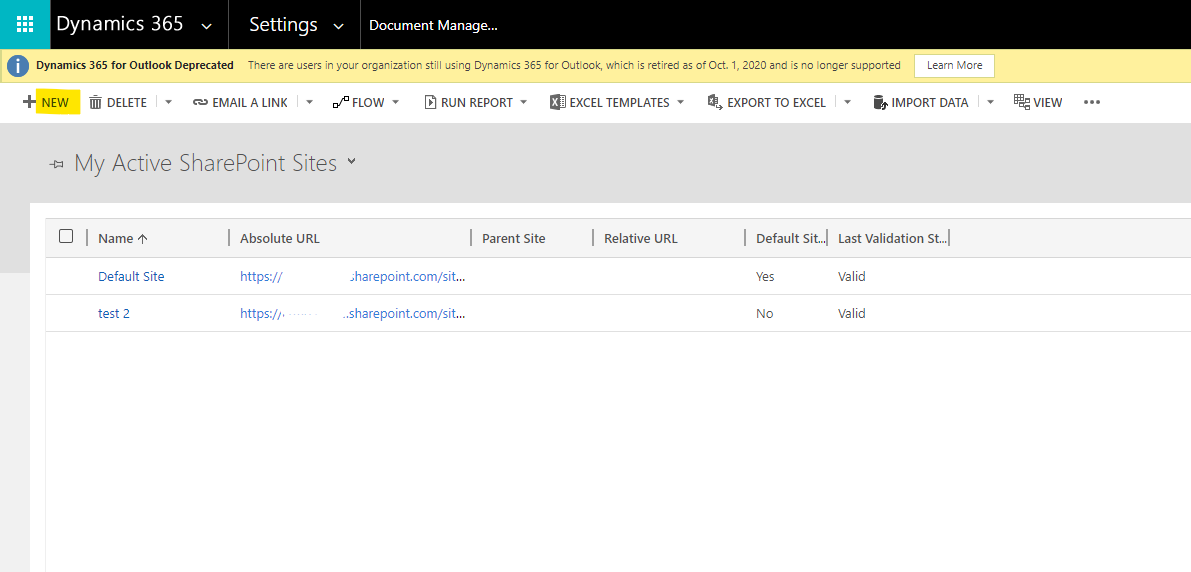
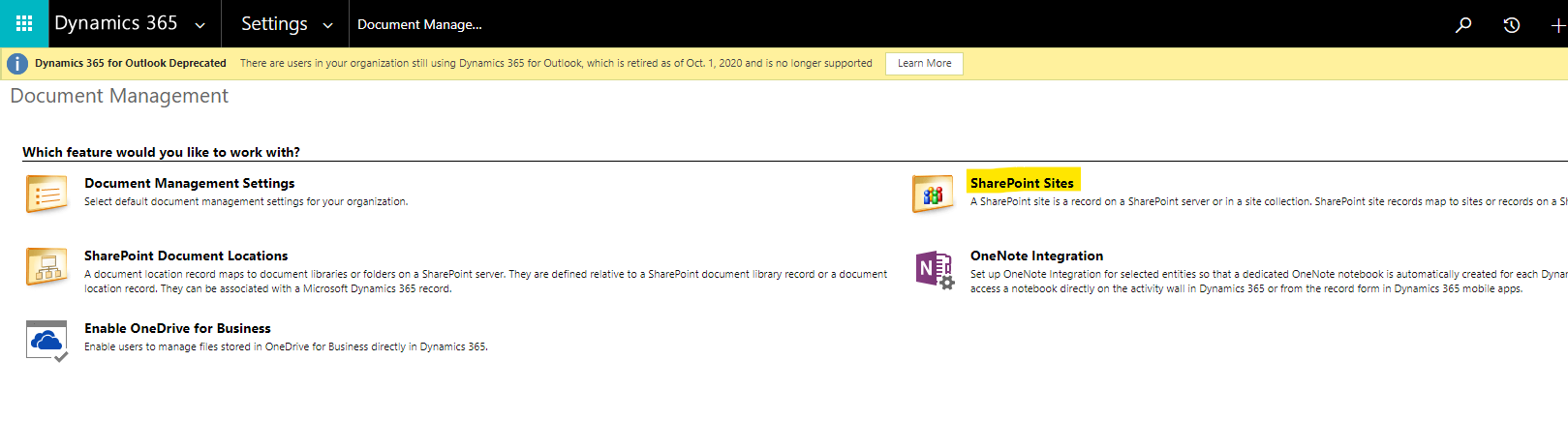
    In the web apps, go to Settings > Document Management > SharePoint Sites, select New.
    pastedimage1608711776080v1.png

    pastedimage1608711802577v2.png

    pastedimage1608711831748v3.png

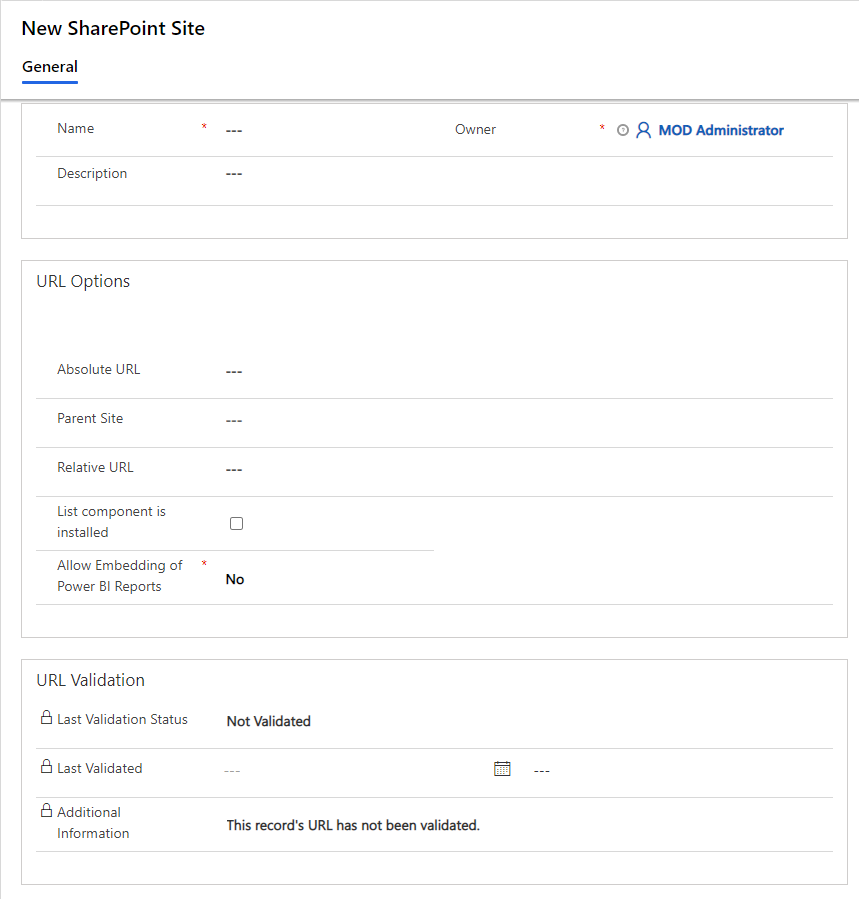
    Fields introduction:

    Name. Add or change the name for the site..

    Owner. By default, the person who created the site is listed as the owner of the site record.

    Description. Add or change the description for the site. For example, specify what documents the site contains.

    URL Type. Specify whether you want to add an absolute (full) or relative URL for the site.

    Absolute URL. To point this site record to a site collection or site in SharePoint, specify the fully qualified URL of the site collection or site. You can use this record as a parent site to create other site records with relative URLs for sites inside the site collection or sites on the same SharePoint site.

    Relative URL. Use this option when you have at least one site record pointing to a site collection in SharePoint. In the Parent Site box, select an existing site record. If the site record that you selected as a parent site points to a site collection on SharePoint, specify the name of an existing site in the second box. If the site record that you selected as a parent site points to a site on SharePoint, specify the name of an existing subordinate site on SharePoint.

  • Suggested answer
    ananeto Profile Picture
    40 on at
    As I noticed that LuHao mentioned my article, I thought I would mention there is a newer version of it at https://www.crmsoftwareblog.com/2022/05/how-to-setup-a-dynamics-365-integration-with-sharepoint/
     
    Also, please be aware that the default settings allow any SharePoint user broad access - maybe even to sensitive Dynamics 365 documents - so you should consider ways of protecting your files such as https://www.connecting-software.com/dynamics-crm-sharepoint-permissions-replicator/
     
    All the best, 
     
    Ana
  • ananeto Profile Picture
    40 on at
    If anyone needs this Dynamics/SharePoint integration, please follow the new tutorial I have just posted at the CRM Software Blog with the up-to-date instructions and screenshots. 
  • Suggested answer
    11manish Profile Picture
    1,079 on at
    For most Dynamics 365 implementations, SharePoint Document Management is the easiest and most maintainable solution. It provides seamless integration between Dynamics 365 and SharePoint, automatically creates document locations for records, and requires minimal configuration. Only consider automating SharePoint site creation if your business specifically requires a dedicated SharePoint site for each customer, project, or business record.
  • Suggested answer
    rajeshjamrodh Profile Picture
    17 on at

    Its a common  functionality  for any D365 CE project .Integrate Microsoft SharePoint Online with Dynamics 365 Customer Engagement (CE) to provide a centralized, secure, and configurable document repository for all CRM business entities.

    The solution enables users to upload, organize, search, and manage documents directly from Dynamics 365 CRM while storing the documents in SharePoint instead of Dataverse, reducing storage costs and improving document management capabilities.

Under review

Thank you for your reply! To ensure a great experience for everyone, your content is awaiting approval by our Community Managers. Please check back later.

Helpful resources

Quick Links

Season of Sharing Community Challenge Winners!

Congratulations to our community stars!

Women in Power Builds Momentum

Expanding mentorship, skilling, and AI innovation

Congratulations to the June Top 10 Community Leaders

These are the community rock stars!

Leaderboard > Microsoft Dynamics 365 | Integration, Dataverse, and general topics

#1
11manish Profile Picture

11manish 109

#2
André Arnaud de Calavon Profile Picture

André Arnaud de Cal... 61 Super User 2026 Season 1

#3
Subra Profile Picture

Subra 30

Last 30 days Overall leaderboard

Product updates

Dynamics 365 release plans